
Gaining financial independence through personal Bitcoin storage offers numerous benefits. Your wealth remains immune to inflation and is safeguarded against arbitrary regulations or geographical limitations. Yet, this endeavor also demands a sense of responsibility.
The optimal approach involves self-education. Dedicate time to comprehend the intricacies of various methods, thus minimizing risks and enhancing financial autonomy.
Taking Custody
1. Withdraw all your Bitcoin from exchanges or custody services
When you have Bitcoin in an exchange or any other custody service, they hold control over your Bitcoin. It is only when you withdraw your Bitcoin onto a set of keys that you control that you truly own it for all practical purposes.
Claiming ownership of your private keys is crucial for ensuring the security and autonomy of your Bitcoin. While exchanges may facilitate buying and selling, they are not reliable long-term storage solutions due to a history of thefts, mismanagement, and accidents resulting in the loss of significant amounts of bitcoin.
You can read more about this topic in this article:
Withdrawing your Bitcoin from exchanges
Choosing and Buying a Hardware Wallet
2. Use Hardware Wallets
Don’t use your general-purpose computer (where you will have all your viruses) for transacting your Bitcoin. The best approach for most people is to use a dedicated hardware device, like a hardware wallet. These devices have secure chips inside, designed to protect the data from physical attacks. While it’s true that some of these devices may have flaws that could be exploited by highly skilled attackers with expensive equipment, this is generally a theoretical concern.
Most instances of theft involve coercing or threatening the user to give up their PIN, which decrypts the hardware device.
In this article, we give details about why you should use a hardware wallet:
Reasons to use a bitcoin hardware wallet
On this website we compare the best hardware wallets, so you can decide which one to buy:
3. Buy your Hardware Wallet directly from the manufacturers
Choosing a trustworthy hardware wallet model is essential, especially if you intend to protect a significant portion of your assets.
Some non-official sellers might sell counterfeit or imitation hardware wallets that look similar to the genuine product but lack the necessary security features. These counterfeit wallets could be easily compromised, putting your Bitcoin at risk. Even unscrupulous sellers might tamper with the hardware wallets before selling them, installing backdoors or malware that could allow them to access your private keys and steal your funds.
Secondhand devices deserve special caution. When you purchase a used wallet, you cannot be certain of its history or whether it has been tampered with by the previous owner. Malicious actors might have compromised the wallet or could have access to its recovery seed or private keys, potentially allowing them to access your bitcoin. Never rely on used or secondhand devices: always purchase new ones directly from the manufacturer’s website or from an authorized reseller.
The more direct, the lower the likelihood of tampering.
On our hardware wallets website, we always provide links to buy hardware wallets (in some cases with discounts) from the official manufacturer sites.
4. Prefer Hardware Wallets with protections against Supply Chain & Physical Attacks
Before a hardware wallet gets into your hand, many people might have handled it before you. These people can include the shipping company, the retailer, the shipping person, and many more. If any of them is a hacker, they can modify the hardware wallet, install some malware, put it back together, and ship it to you. Some manufacturers protect you against these supply chain attacks using different approaches:
- Deleting the whole system if they detect a breach. A complete deletion gets rid of the private key, meaning there will be nothing left for the hacker to salvage.
- Verification of Authenticity: Utilizing cryptographic signatures to sign the firmware and software loaded onto the hardware wallets. This helps users verify the authenticity and integrity of the device’s software.
- Secure Packaging and Sealing: Implementing tamper-evident packaging and sealing mechanisms to make it evident if a device has been opened or tampered with during transit.
- Secure Boot: Implementing a secure boot process that ensures only verified and signed firmware can be loaded onto the device.
- Firmware Updates Verification: Requiring firmware updates to be digitally signed and verified before installation to prevent unauthorized changes to the device’s software.
- Shipping wallet without firmware installed to ensure that you install an authentic and the most recent firmware version.
5. Use an alternative e-mail address when buying a Hardware Wallet
When buying a hardware wallet, using an alternative email address is advised for several reasons.
By using a different email address, you reduce the risk of your primary email being associated with your hardware wallet purchase. This can help minimize targeted phishing attempts and spam related to bitcoin. Also, cybercriminals often target bitcoin users, so using a separate email address makes it slightly more difficult for them to target you.
If your primary email is compromised, having used an alternative email for your hardware wallet purchase can limit exposure to your financial information and bitcoin-related activities.
One tool you could use is SimpleLogin. With email aliases, you can be anonymous online and protect your inbox against spam and phishing.
SimpleLogin | Open source anonymous email service
6. Use an alternative phone number when buying a Hardware Wallet
Using an alternative prepaid phone number, rather than your real phone number, for registration when purchasing a hardware wallet is advisable for several reasons.
Your real phone number is often linked to your identity and personal information. By using an alternative prepaid phone number, you reduce the risk of exposing your real phone number to potential threats such as phishing attacks or spam.
Using an alternative phone number helps maintain anonymity in your bitcoin-related activities. It makes it more difficult for third parties to link your hardware wallet purchase to your real identity.
Cybercriminals often target individuals involved in bitcoin transactions. Using a prepaid phone number adds an extra layer of protection by making it harder for them to target you specifically based on your hardware wallet purchase.
Prepaid phone numbers typically offer more control over who can contact you and when. You can easily dispose of or change a prepaid number if you start receiving unwanted communication, without affecting your primary means of communication.
Some good alternatives:
7. Use bitcoin to pay when buying a Hardware Wallet
When purchasing a hardware wallet, using Bitcoin for payment enhances privacy by minimizing the amount of personal and financial information associated with the transaction. Bitcoin transactions are pseudonymous, meaning they are not directly tied to your identity unless you explicitly link your Bitcoin address to personal information.
On our hardware wallets website, we have an OFFICIAL STORE section so you can see which hardware wallet manufacturers offer to pay for their products with bitcoin.
8. Use TOR or VPN when buying a Hardware Wallet
When buying a hardware wallet, using TOR (The Onion Router) or a VPN (Virtual Private Network) offers additional layers of privacy and security.
TOR is a network that anonymizes your internet traffic by routing it through a series of volunteer-operated servers, making it difficult for anyone to trace your online activities back to you. Similarly, a VPN encrypts your internet connection and routes it through a remote server, masking your IP address and making it harder for third parties to monitor your online behavior.
By using TOR or a VPN when purchasing a hardware wallet, you obscure your IP address and location, enhancing your anonymity and privacy. This makes it more challenging for potential attackers or surveillance entities to track your online transactions or gather information about your hardware wallet purchase.
9. Use a PO Box when buying a Hardware Wallet
Sending a hardware wallet to a PO Box when purchasing it can be a prudent security measure, especially when considering the sensitive nature of the device and the potential risks associated with its delivery. Here’s why it’s considered a good practice:
- Privacy Protection: Utilizing a PO Box adds an extra layer of privacy to your transaction. Instead of having the hardware wallet delivered directly to your home address, which might be more easily accessible to prying eyes or potential thieves, having it sent to a PO Box ensures that only you have access to the package.
- Security Enhancement: Hardware wallets are designed to securely store bitcoin private keys, and their compromise could lead to substantial financial losses. By having the wallet delivered to a PO Box, you reduce the risk of interception during transit or theft upon delivery, as PO Boxes are typically located in secure areas and require a key or access code for retrieval.
- Prevention of Package Theft: Unfortunately, package theft is a common occurrence, especially for valuable items like electronic devices. Having the hardware wallet sent to a PO Box reduces the likelihood of it being stolen from your doorstep before you have a chance to collect it.
- Anonymity: While bitcoin transactions are often pseudonymous rather than truly anonymous, taking steps to dissociate your physical address from your bitcoin-related purchases can contribute to better privacy practices overall.
- Control Over Delivery: With a PO Box, you can choose when to pick up your package at your convenience, rather than relying on the timing of a delivery to your home address. This reduces the window of vulnerability during which the package might be unattended.
On our hardware wallets website, we have a PO BOX SUPPORT section so you can see which manufacturers support sending the wallet to a PO Box.
10. Understand how the hardware wallet manufacturer thinks about the Bitcoin ecosystem
It’s very important to understand how a hardware wallet manufacturer thinks about the Bitcoin ecosystem. Understanding the hardware wallet manufacturer’s perspective on the Bitcoin ecosystem is important to ensure the security, compatibility, user experience, innovation, and trustworthiness of the wallet you are considering purchasing. It allows you to make an informed decision and choose a hardware wallet that aligns with your specific needs and preferences in the context of the Bitcoin ecosystem’s dynamics.
These are some of the many aspects to consider:
- Security: You can assess their commitment to security practices. A reputable manufacturer with a deep understanding of the ecosystem is more likely to prioritize robust security measures in their wallet design.
- Innovation and Development: The Bitcoin ecosystem is constantly evolving, with new technologies, features, and improvements being introduced regularly. A hardware wallet manufacturer that actively engages with the Bitcoin community and contributes to its development is more likely to stay up-to-date with the latest advancements. This ensures that the hardware wallet you purchase will continue to be supported and updated over time, adapting to the changing needs of the Bitcoin ecosystem.
- Trust and Reputation: The reputation and trustworthiness of a hardware wallet manufacturer are paramount when it comes to securing your valuable Bitcoin holdings. You should measure their commitment to transparency, open-source development, third-party audits, and the overall security track record of their products.
That’s why we include social media links and official blog posts on https://thebitcoinhole.com.
11. Use provided cables from device manufacturers
Using provided cables can help you avoid potential pitfalls with third-party accessories. Some third-party cables may not meet the necessary specifications or might introduce security vulnerabilities, such as data leaks or unauthorized access. By sticking to the cables provided by the manufacturer, you can minimize the risk of such issues and ensure a more secure experience when handling your Bitcoin transactions and storage.
Firmware and Device Security
12. Prefer a hardware wallet with source-available firmware
A hardware wallet with source-available firmware is released through a source code distribution model where the source can be viewed, and in some cases modified, but without necessarily meeting the criteria to be called open-source. Any firmware is source-available as long as its source code is distributed along with it, even if the user has no legal rights to use, share, modify, or even compile it.
These hardware wallets allow users to review the source code, ensuring transparency and trust in the device’s operations. Users can examine how the wallet handles their sensitive information and verify that it aligns with their expectations. The availability of the source code also facilitates security audits by independent experts and the broader community. This scrutiny helps identify vulnerabilities or weaknesses in the wallet’s design, enabling timely fixes and improvements to enhance overall security.
On our hardware wallets website, we have a SOURCE-AVAILABLE section so you can see which wallets have their firmware source available.
Source-available Hardware Wallets - The Bitcoin Hole
13. Keep yourself updated on firmware upgrades
Firmware upgrades often include security improvements that address newly discovered vulnerabilities or potential attack vectors. By staying up-to-date with the latest firmware, you can ensure that your Bitcoin hardware wallet is secure, protecting your digital assets.
Keeping your devices updated also allows you to take advantage of improvements and get the most out of your Bitcoin hardware and software.
Finally, staying informed about firmware updates allows you to make informed decisions about when and how to upgrade your devices. In some cases, firmware updates may require specific actions on your part, such as backing up your wallet’s seed phrase or updating related software. By keeping yourself updated, you can be prepared to perform these tasks and ensure a smooth upgrade process.
Use another device if you want to experiment with firmware features that you don’t actually need for your main wallet.
14. Subscribe to the security advisories of the devices you own
Knowing that a vulnerability exists is what makes every other precaution in this article actionable. Documenting how your keys were generated is useless if you never find out that a disclosure affects your exact model and firmware version. Set up the channels while everything is calm:
- Follow the official disclosure channel of each manufacturer, which is usually a security page, a blog RSS feed, a mailing list, a Nostr account or the releases and security advisories section of their code repository.
- Prefer pull-based channels like RSS over giving away your identity. If you subscribe by email, use the alternative address you already used to buy the device, not your primary one. The same reasoning applies here as when purchasing: your subscription list should not reveal which devices you own.
- Include the devices you no longer use. If a seed generated years ago on a retired device is still holding funds, that device’s advisories still apply to you.
- Cover your companion software too, not only the hardware. Wallet apps, coordinator software and even the libraries they depend on have their own advisories.
- Follow independent researchers and community channels, not only the vendor. Manufacturers sometimes disclose late, downplay the severity, or announce a fix without describing which users were exposed.
When an advisory arrives, resist the urge to act immediately. Read the affected scope carefully, compare it against your own documentation, and only then decide whether you need to upgrade, rotate keys or do nothing at all.
15. Don’t install firmware on release day, and stagger it across signers
Staying updated does not mean being first. Every firmware release is new code, and new code can introduce regressions that were not caught in testing, including bugs in key generation, in signing or in the recovery flow. Waiting gives the community time to find those problems for you.
A reasonable policy:
- For a critical security patch that fixes something you are actually exposed to, upgrade promptly. Waiting has a real cost here.
- For everything else, let the release sit for a few weeks. Watch the manufacturer’s issue tracker and the community channels before installing it.
- Upgrade a spare or low-value device first, if you own one, and confirm the basic flows still work: unlock, display an address, sign a transaction, and recover from your seed backup.
- Never upgrade right before you need to move funds. Do it when you are not under time pressure, and always with a verified backup at hand.
In a multisig setup, this becomes a structural protection: do not upgrade every signer to the same version on the same day. Keeping temporal diversity across your quorum means that a defective release cannot break, or compromise, all of your signers at once. Upgrade one signer, use the wallet normally for a while, and only then move on to the next. It is the same principle behind using different brands for each key, applied to time instead of hardware.
16. Verify the firmware before upgrading your wallet
Verifiable Source wallets let you inspect code for flaws, but pre-compiled software lacks a way to verify if it matches the source. Reproducible builds ensure that anyone can recreate identical copies from source code, build environment, and instructions. That’s why it is important for all wallet users to learn how to build the firmware and verify it before upgrading their wallets. If not possible for you, at least see if there are proofs of others doing that verification. One good place to find those proofs is https://bitcoinbinary.org
On our hardware wallets website, we have a REPRODUCIBLE BUILDS section so you can see which wallets offer reproducible builds instructions and if there are proofs of verification.
Hardware Wallets with Reproducible Builds - The Bitcoin Hole
17. Prefer hardware wallets with BTC-Only Firmware
Bitcoin-only firmware only supports Bitcoin. Less code means less attack surface which further improves your security when only storing Bitcoin.
On our hardware wallets website, we have a BITCOIN-ONLY FIRMWARE section so you can see which wallets have BTC-Only Firmware.
Hardware Wallets with Bitcoin-Only Firmware - The Bitcoin Hole
18. Prefer offline firmware updates via SD Card
Offline updates via SD card provide key safeguards:
- Your device (keys) is isolated from the internet during updates. Your keys cannot be extracted remotely.
- Secure data transmission via the SD card ensures a strict one-way flow to the device. Nothing leaves your device.
Even if data were somehow transmitted from your device to the SD card, the wallet manufacturer has no ability to access or interact with users’ SD cards.
Other approaches, like upgrading the firmware over USB or Bluetooth, are less secure, but not for the reason people usually assume. A well-designed hardware wallet never exports your private keys over any transport, so a companion app cannot simply read them out of the device. The real risks are different:
- A two-way channel is an attack surface. The device has to parse whatever the host sends it, so bugs in its USB or Bluetooth stack become reachable from a compromised computer or, in the case of Bluetooth, from an attacker who never touches your device.
- Malicious or downgraded firmware. A compromised host can try to push a tampered build, or to roll you back to an older version with a known vulnerability. If that firmware ends up running on the device, it is the firmware that leaks your seed, not the companion app.
- Manipulation of the update in transit. If the firmware image is intercepted before it reaches the device, everything depends on the signature check performed on the device itself.
An SD card does not remove the need to verify signatures and reproducible builds, but it does mean your device never has to talk to a general-purpose computer in order to be updated.
On our hardware wallets website, we have a FIRMWARE section so you can see which wallets support upgrading the firmware using an SD card.
19. Prefer air-gapped hardware wallets
100% air-gapped hardware wallets can sign transactions, create/restore a wallet and upgrade the firmware without connecting the device to a cellular network, wifi, Bluetooth, USB, or NFC. This guarantees that your private keys never touch the internet.
In contrast to the types of communication mentioned above, most fully air-gapped wallets use scannable QR codes for transactions, though some may also use micro-SD cards.
On our hardware wallets website, we have a 100% AIR-GAPPED section so you can see which wallets are 100% airgapped.
Air-gapped Hardware Wallets - The Bitcoin Hole
20. Prefer hardware wallets that follow security standards in generating nonces
To ensure the highest level of security, it’s essential to use hardware that adheres to established security standards for nonce generation. One such standard is RFC6979, which specifies the use of deterministic nonces. Unlike traditional nonces, which are randomly generated, deterministic nonces are calculated in a predictable and repeatable way based on the transaction data and private key. This predictability ensures that the same nonce is always generated for the same data, eliminating the risk of generating a weak or reused nonce.
Why is this important? Nonces play a pivotal role in securing your private keys during the transaction signing process. If a nonce is reused or improperly generated, it can expose your private key, making your Bitcoin vulnerable to theft. By using hardware that follows RFC6979, you can significantly reduce the risk of such vulnerabilities. This standard ensures that nonces are generated in a secure and deterministic manner, effectively safeguarding your Bitcoin from cryptographic attacks.
Companion Software
21. Prefer using third-party companion software
If you buy a hardware wallet and connect your wallet to their official companion software, you are trusting 100% in a single manufacturer. Instead, you can improve your security, and reduce your trust in a single company by using a third-party open-source wallet instead of the official one. But take into account, that not all the hardware wallets support connecting to a third-party app.
On our hardware wallets website, we have a THIRD-PARTY APPS section so you can see which wallets support connecting with some popular third-party apps like Electrum, Nunchuk, Sparrow, Specter Desktop, Blockstream Green, BlueWallet or Bitcoin Keeper.
22. Verify the authenticity of third-party companion software
Verifying the authenticity of software downloads is crucial in the Bitcoin ecosystem. Companion software has access to sensitive information. Malicious software can steal this information, leading to the loss of funds or unauthorized transactions.
Protecting user privacy is another reason to verify authenticity. Malicious actors can introduce software that spies on users or collects personal information without consent. By ensuring that you are using the official and unaltered version of the software, you can better protect your privacy and maintain control over your digital assets.
23. Verify the addresses generated by the companion app
Malware or hacking attacks on devices or online platforms can compromise the security of your Bitcoin address. Attackers may modify the address you use to receive funds, directing the payment to their own wallet instead. By cross-checking the address and ensuring its integrity through verification, you can reduce the risk of falling victim to such attacks.
You can verify the addresses generated by the companion app, using a second companion app or, when possible, a hardware wallet.
On our hardware wallets website, we have a SCREEN section so you can see which wallets have a screen that can be used to verify transactions.
24. Keep Android Software Wallets out of sight
On Android 15 you can hide all your sensitive apps in a private space, and increase your privacy.
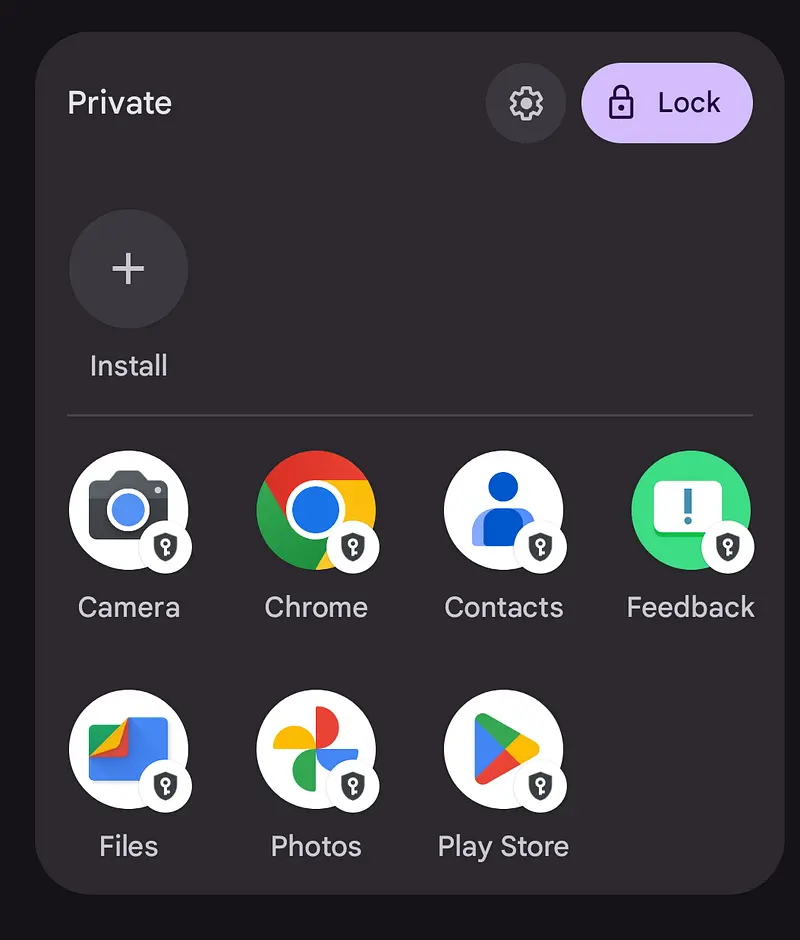
More info: https://support.google.com/android/answer/15341885?hl=en
Protecting Your Hardware Wallet
25. A Hardware Wallet in your pocket is not a good idea
Don’t walk around with your hardware wallet in your pocket. Just put it somewhere safe.
Some reasons:
- Carrying a hardware wallet in your pocket exposes it to potential physical damage, such as being dropped, or exposed to water or other liquids.
- A hardware wallet in your pocket is an easy target for thieves. If your wallet falls into the wrong hands, the thief could gain access to your Bitcoin and potentially steal them.
- It’s easy to misplace small items like a hardware wallet, especially if it’s in your pocket.
- Although hardware wallets are designed to be secure, carrying them around with you increases the risk of them being compromised.
- If you use your wallet in public, someone can always be watching you directly, or on CCTV
26. Use a strong PIN for your Hardware Wallet
To ensure the security of your device, it is important to use a unique and strong PIN when setting it up. Avoid using easily guessable passwords like your phone number or date of birth, as well as any passwords you may use for your social media, email, or other accounts. By using a unique PIN, you can prevent unauthorized access to your device, even if someone has physical access to it.
On our hardware wallets website, we have a DEVICE LOCK section so you can see all the different features related with the device lock.
27. Use Faraday bags to protect your Hardware Wallet
A Faraday bag can protect Bitcoin hardware wallets from two primary threats: radio waves and electromagnetic pulses. Whether Faraday bags are an essential tool for securing your hardware wallet(s) depends on your threat tolerance.
The following article discusses what Faraday bags are, how they’re used to secure Bitcoin hardware wallets, and the reasons why you might use one.
Faraday bags: Do you need one for your bitcoin hardware wallet? - Unchained Capital
If you decide to buy a Faraday bag, here are some good options:
28. Avoid using your hardware wallet as a 2FA or Password Manager
Using a hardware wallet as a 2FA (two-factor authentication) method or Password Manager may seem like a convenient option, but it’s not recommended. A hardware wallet is primarily designed to securely store your Bitcoin private keys. Using it as a 2FA device or a Password Manager means that you’ll be exposing your hardware wallet to additional risks, such as potential malware attacks or physical theft.
Generating Your Keys
29. Document how your keys were generated
Every time you create a wallet, write down exactly how it was born. Months or years later, when a vulnerability is disclosed, this record is the only thing that will tell you whether your keys are affected or not.
At a minimum, keep track of:
- Device: manufacturer, model and hardware revision (for example, Coldcard Q, BitBox02 Bitcoin-only, Jade Plus).
- Firmware version: the exact version installed at the moment the seed was generated, not the one running today. Note also whether you verified the firmware signature or reproducible build before installing it.
- Date: when the seed was generated and when the wallet was first funded.
- Entropy source: device RNG only, dice rolls, coin flips, user-added entropy mixed with the device RNG, or an imported seed. If you used dice, record how many rolls and which method.
- Seed details: 12 or 24 words, BIP39 passphrase used or not (never the passphrase itself), and whether Seed XOR or a similar split was applied.
- Wallet template: derivation paths, script types, and for multisig the M of N scheme and every xpub involved.
- Companion software: which app and version was used to create the wallet, verify addresses and receive the first deposit.
- Purchase details: where and when the device was bought, and whether the tamper-evident packaging was intact.
Why does this matter so much? Because key generation bugs do happen. On July 30, 2026, a bug was disclosed in Coldcard's entropy generator, and the first question every owner had to answer was: which firmware version generated my seed, and did I add my own entropy with dice? Users who kept a record could immediately tell whether they were exposed. Users who did not had to assume the worst and rotate their keys anyway, an expensive and stressful operation that also has an on-chain cost and a privacy cost.
The same applies to any other class of incident: a weak RNG, a bad batch of devices, a compromised firmware release, or a companion app that generated wrong addresses. Vulnerability disclosures are almost always scoped to specific models, firmware ranges and dates. Without your own record, you cannot match your setup against that scope.
A few practical notes:
- Keep this document with each seed backup, in the same way you keep the wallet template described later in this article. On its own it does not expose your funds, but it does describe your setup, so treat it as sensitive from an OPSEC standpoint and store it in an access-controlled location.
- Write it on paper, not in a cloud note. If you keep a digital copy, encrypt it.
- Update it whenever something changes: a firmware upgrade, a passphrase rotation, a new signer added to a multisig quorum, or a migration to a new device. Add the date of every change.
- Do the same for every device in a multisig quorum, since each signer can have a different brand, firmware and generation method.
- Combine it with the periodic health checks described later: when you verify your backups, also verify that the documentation still matches reality.
This habit costs you ten minutes during the setup, and it is what turns a scary disclosure into a five-minute check instead of a full migration.
30. Generate your own entropy
When creating your own keys, there are many ways to do it, since we just need a very long random number. Sadly, people aren’t good at making random numbers. This is why brain wallets, which use phrases from songs, books, or poems, aren’t safe. If you use a popular phrase for a brain wallet and send money to it, you’ll lose the money quickly.
To make a truly random number, one way is to use high-quality dice, like those found in casinos. Roll them several times to create a long random number. This number can then be used to create a secure code.
It’s important to generate these keys offline, without internet, to keep them safe. It’s hard to be sure a device connected to the internet doesn’t have harmful software on it. It’s also hard to create a completely offline computer, only experts with lots of time should try this.
Once you have made the keys, don’t leave them on the device if you don’t need them there. It’s not safe to have keys lying around.
Prefer entropy you can verify yourself. Adding your own entropy is only half of the job. What really protects you is being able to check that the seed you ended up with is actually derived from the randomness you produced. Rolling dice on a device that mixes your input with its internal random number generator, in a way you cannot audit or reproduce, still leaves you trusting that generator.
The strongest approach is to run the whole derivation yourself, offline:
- Produce raw entropy by hand with dice or coin flips, and write down the bits, 128 bits for a 12-word seed, 256 bits for 24 words.
- Split those bits into groups of 11 and map each group to its BIP39 word index.
- Compute the SHA-256 checksum to obtain the last word.
- Recompute the same result with a second, independent offline tool to confirm every word matches.
Good offline tools for the checksum and verification step are SeedSigner, Specter DIY, Seedpicker or a local copy of the Ian Coleman BIP39 tool running on an air-gapped machine that is wiped afterwards. Never do this step on an internet-connected computer or phone.
Our own step-by-step guide walks you through the whole procedure with printable sheets, from the first coin flip to the last word:
How to Create your Bitcoin Seed Phrase with a Coin
This article explains the same manual procedure (in Spanish):
¿Confías en tu semilla? No confíes, hazla tú mismo - Estudio Bitcoin
Some hardware wallets like BitBox02, Coldcard Mk4, Coldcard Q, Jade and Keystone allow users to generate their own true random number (entropy) with rolling dice. Tapsigner setup process combines your entropy (random bits) with secret entropy picked by the card.
Here you can see all the hardware wallets with user added entropy support:
Hardware Wallets with User Added Entropy support - The Bitcoin Hole
31. Use 12 words seed phrases
A 12-word seed phrase contains 128 bits of entropy. This is the minimum length to maintain the security of the private keys. If we shortened the seed to 10 words, for example, it would compromise the security of the private keys and make both the keys and the seed words vulnerable to brute-force attacks.
Using a 24-word seed phrase may offer additional entropy, but it wouldn’t improve the security of the underlying private keys beyond 2¹²⁸ operations, the same as a 12-word seed. Longer seed phrases don’t enhance the security of the private keys themselves; they only increase the difficulty of brute-forcing a given seed phrase, which is already statistically impossible for a 12-word seed phrase.
A longer phrase can be less convenient for manual entry or backup storage.
A 12-word phrase strikes a balance between security and usability for the majority of Bitcoin users.
Here you can see all the hardware wallets with 12 Words BIP39 Seed support:
Hardware Wallets with 12 Words BIP39 Seed support - The Bitcoin Hole
Backing Up Your Seed Phrase
32. Don’t use your memory as your unique backup
Some bitcoiners choose to memorize their seed phrase and discard all backups, believing that this eliminates security threats. This approach allows for maximum control and flexibility. For example, if a person memorizes their seed phrase, they can access their bitcoin from anywhere and travel across borders to a friendly regime, whereas a paper copy could be seized. Memorizing a seed phrase can be a powerful security tool, but it also creates a single point of failure: you.
You can read more about this topic in the following article:
Is memorizing your seed phrase a good idea?
33. Never share your Seed Phrase
Your seed phrase is the key to accessing all your funds. Under no circumstances should you ever share your seed phrase with anyone. Nobody has a valid reason to request your seed phrase.
34. Don’t store your Seed Phrase online
Storing your Seed Phrase in a digital document, such as a text file, exposes it to potential online threats. Malicious software could track your keystrokes or gain unauthorized access, violating the golden rule of sharing. Similarly, taking a photo, a screenshot, or storing it in the cloud (like Google Drive, or a Password Manager) introduces the same risks, rendering it an insecure option. It is essential to store your Seed Phrase offline.
This rule covers your seed phrase and your passphrase, the only two things that can actually move your coins. It does not cover the descriptive parts of your setup, such as your wallet template or your multisig configuration file, which cannot spend anything on their own. Those follow the opposite logic, and we explain why later in this article.
35. Multiple backups for your recovery key(s)
Having multiple backups is a good practice, but you need to balance complexity with convenience. You’ll have to decide how much redundancy you want and ensure that each backup is secure.
The default for many wallets is to provide a seed phrase, which some suggest writing down on a piece of paper. Making multiple copies of that paper and storing it in different locations can increase your risk, as more places could be exposed to physical threats. This could result in someone, either intentionally or accidentally, finding the seed phrase and using it to access your wallet and steal your funds.
It’s crucial that your backups are physically secure. If you don’t have the technical expertise to encrypt them, make sure your backups are stored in highly secure locations, where unauthorized individuals won’t be able to access them.
36. Keep keys geographically distributed
Keeping Bitcoin keys geographically distributed is a good practice because it reduces the risk of theft or loss. If all your keys are stored in one location, they become a single point of failure. In case of a break-in or robbery, you could lose all your keys at once. Distributing them in different locations makes it harder for a thief to access them all.
Furthermore, storing keys in separate locations protects you against natural disasters, such as fires, floods, or earthquakes, which could destroy your keys if they were all kept in the same place. By having them in different locations, you increase the chances of preserving your keys in the event of such disasters.
Lastly, geographical distribution can help protect against targeted attacks. If an attacker knows the location of one key, it becomes more difficult for them to access the others, adding an extra layer of security to your Bitcoin holdings.
37. Keep all keys in access-controlled locations
An individual is unable to be present in multiple locations simultaneously, and when dispersing keys efficiently, some might be stored in areas that are not constantly under surveillance.
To keep your keys safe, don’t leave them out where anyone can see them. Use things like lock boxes, safes, and special boxes at the bank. Make sure you know where all your house keys and secret codes are. This stops someone from finding and taking your stuff, which can be a problem or even a danger to the things you own.
38. For singlesig, encrypt your keys
How should we store the keys? If the backups of your keys aren’t encrypted or aren’t part of a multi-signature setup, they can become a single point of failure. This means that if someone gains unauthorized access to the backup, they could potentially compromise your entire wallet and its funds. To mitigate this risk, it’s essential to keep backups encrypted and consider using a multi-signature setup for added security.
So, it’s important to keep them encrypted at rest, meaning that if someone physically finds the keys, they won’t be able to use them. This helps protect against various threats, including accidental exposure or malicious attacks.
There are countless ways to encrypt data, and choosing the right method depends on your individual needs and technical expertise.
39. Use Metal Backups
Metal backups are a more reliable option compared to paper backups. However, you still need to be cautious when choosing the right product. Over the years, Jameson Lopp has tested more than 70 different metal backup devices, many of which are marketed as indestructible. While about half of them live up to that claim, the other half do not.
Metal Bitcoin Seed Storage Reviews
Fortunately, he has provided ratings for these devices to help you determine which ones are the best. However, there is still a concern when using a single signature wallet or a single, unencrypted seed phrase on a metal backup. If someone else gets hold of that backup, they can access your funds.
These devices have been tested for heat resistance (up to 2000 degrees Fahrenheit or approximately 1093 Celsius), corrosion resistance (in hydrochloric acid), and deformation resistance (using a 20-ton hydraulic shock press).
For a reliable and simple solution, consider choosing a metal backup device with straight A’s across the board. A single-plate device with center punch engraving is a good option to securely store your seed phrase.
You can also discover some good metal backups on our website:
Compare Seed Backup Solutions - The Bitcoin Hole
40. Use Tamper Evident Seals
To ensure the integrity of your seed phrase backup, it is recommended to place it in a tamper-evident bag. This will provide assurance that no unauthorized access has occurred. Remember to record the serial number of the bag in a secure location to maintain its tamper-evident properties. Failing to do so could enable an attacker to open the bag and reseal it with an identical one.
41. Backup a template that describes your wallet
It’s important to have a template that describes your wallet, including information such as derivation paths, script types, and details about multi-sig setups like M of N and the public keys involved. Wallet output descriptors may become a simpler solution in the future, but currently, not many wallets support them.
If you lose your day-to-day wallet and need to recover from your seed phrase, having a template with all of this information can save you from a potentially lengthy and challenging treasure hunt. Walletsrecovery.org is a website that lists all the different derivation paths and types for every Bitcoin wallet, which can be helpful if you have the keys but don’t know the other aspects of your wallet.
Make sure to keep a copy of your wallet template with every seed phrase backup, as it is not sensitive private information. Even if an attacker obtains the template, they can’t do anything with it unless they have access to the necessary private keys. This way, you’ll have all the information you need to recover your wallet if needed.
42. Avoid using paper wallets
Avoid using paper wallets, as they have several drawbacks and risks. Many paper wallet websites might be malicious, generating private keys that are either already controlled by an attacker or are weak and easily guessed. Paper wallets are usually unencrypted, making them vulnerable to theft. Additionally, paper is susceptible to environmental damage.
Using a paper wallet that creates a single private key instead of a seed phrase can also lead to a less-known usability issue. If you load the private key into a wallet and spend only a part of the funds, the remaining funds will go to a change address on a different private key, which is not backed up. Some people have learned this the hard way by accidentally deleting their wallet after spending funds from it once, only to find out later that their remaining balance is gone.
43. Harden the Place Where You Store Your Keys
Your seed backups and hardware wallets are only as safe as the room they live in. Reduce physical and environmental risk with a small, local-first security stack: door/window and vibration sensors on the safe or cabinet, a smoke/CO and water-leak sensor to prevent accidental loss, a camera or local NVR watching the area, and a UPS so alerts still work during outages. Prefer devices that don’t require cloud accounts, support local control (e.g., Matter/Home Assistant), use strong encryption, and avoid microphones/voice assistants in the storage room. Automate tamper alerts, schedule periodic self-tests, and keep gear discreet to preserve OPSEC.
44. Don’t keep a majority of your keyset on your person or at your primary place of residence
This principle advises against the concentration of your bitcoin keys in one place, especially on your person or at your primary residence. The rationale behind this advice lies in risk diversification and safeguarding your digital wealth.
Carrying your keys with you or storing them at your primary residence makes them susceptible to physical dangers. Loss, theft, or damage to the device containing your keys can lead to permanent loss of access to your Bitcoin.
By adhering to this principle, you aim to minimize these risks. Instead, you can explore safer alternatives for key storage, such as hardware wallets or secure, offsite locations. These alternatives disperse the risk and ensure that even if one location or device is compromised, your entire bitcoin holdings remain secure.
Passphrases
45. For singlesig, use a passphrase
Passphrase is an optional feature of some wallets that allow users to create hidden wallets. Passphrases serve as a function of second-factor protection of the recovery seed and are the ultimate protection against attacks involving physical access to the device or the recovery seed.
There is no such thing as an “incorrect passphrase”: every phrase you enter opens a different, equally valid wallet, and you can create as many as you want. That property is what lets a decoy balance and your real savings live on the same device and the same seed phrase.
In practice that means keeping a small everyday balance with no passphrase at all, and the bulk of your savings behind a phrase that is never stored next to the seed backup. If you are ever forced to unlock the device, the PIN opens a real wallet with real coins in it — just not the one that matters.
So, if you have a passphrase enabled, you can locate your seed phrase in one place and your passphrase in another different location.
On our hardware wallets website, we have a PASSPHRASE SUPPORT section so you can see which wallets support adding a passphrase to your seed phrase.
Hardware Wallets with Passphrase support - The Bitcoin Hole
46. Generate a strong passphrase
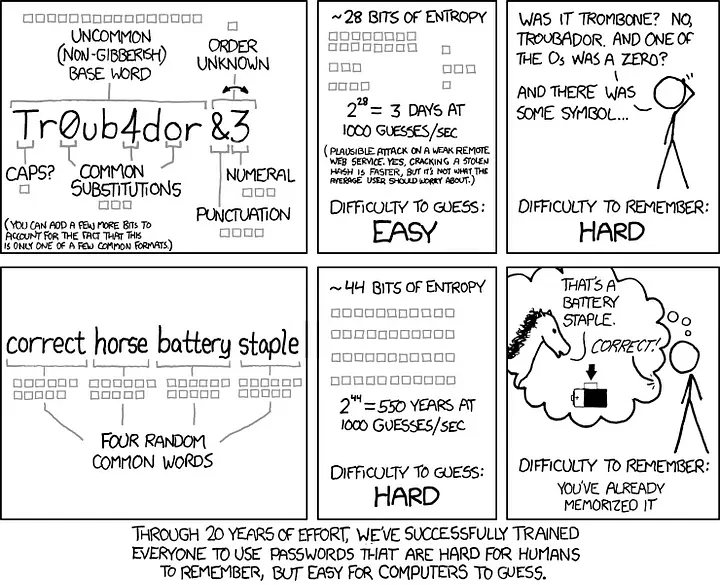
Six to eight randomly picked English words are enough to protect your seed. Six is the floor, and eight is a better default for anything you consider long-term savings.
The reason to aim that high is a detail most guides skip: BIP39 derives your seed using PBKDF2-HMAC-SHA512 with only 2048 iterations. That is very little key stretching by modern standards, so the passphrase is not meaningfully protected by the derivation function and has to carry the entropy on its own. In the only scenario where a passphrase actually matters, an attacker who already holds your seed words, candidates can be tested at enormous speed on ordinary hardware. A memorable word, a pet name or a date is broken in minutes.
Each word of the BIP39 word list is worth 11 bits, since the list has 2048 entries. Six words give you 66 bits and eight words give you 88.
Use dice or coin flips to pick the words 100% offline, never your own head. Phrases taken from songs, books, poems or scripture are a bad idea for the same reason brain wallets are: attack dictionaries are built from exactly those corpora. Because the BIP39 list has 2048 = 2¹¹ entries, eleven coin flips map to one word with no bias. We explain how to do it, with a printable sheet, in this guide:
How to Create your Bitcoin Seed Phrase with a Coin
Write the words in lowercase, separated by a single blank space, and avoid numbers, capitals, accents and special characters. This is not about being lazy, it is about surviving recovery:
- There is no checksum. Unlike your seed phrase, any string is a “valid” passphrase and silently opens a different wallet. A typo raises no error, it just shows up as an empty balance.
- Unicode normalization is a real hazard. BIP39 specifies NFKD, but implementations differ. Accents, non-ASCII characters or emojis are a genuine way to end up unable to recover on a different device or app.
- Spaces are ambiguous. Some wallets trim them and some do not, and a trailing space changes the wallet entirely. Be consistent, and write down exactly which separator you used.
- Metal backups get misread.
lversusIversus1,Oversus0, and “where was the capital letter?” are common causes of lost funds.
Finally, back it up. The most common way to lose money with a passphrase is not theft, it is forgetting it. Treat it as spending authority: store it on metal, never in a digital file or a password manager, and keep it in a different location from your seed backup, which is the entire point of having one. Then rehearse a full recovery before funding the wallet seriously.
Source: https://xkcd.com/936/
47. Enter your Passphrase only on your hardware wallet
Some hardware wallets have minimal buttons, making it quite challenging to input a BIP39 optional passphrase using only two buttons, since the standard allows any combination of letters, numbers and special characters.
To simplify the passphrase entry process, some hardware wallets enable users to enter the passphrase on the host device, which then transfers it to the hardware wallet. This approach compromises some of the security benefits of using a passphrase since the host device learns the passphrase, which is part of your backup. However, it also exposes users to a more severe attack:
A manipulated passphrase is sent to the hardware wallet. When entering your passphrase on a malicious host device, an attacker could secretly transmit a different passphrase to your wallet. Everything will appear to function normally until you attempt to make a transaction. The attacker can then hold your coins hostage, potentially only revealing the correct passphrase after receiving payment.
Always use a hardware wallet that allows you to input your passphrase directly on the hardware wallet. As a result, the host device never gains access to the passphrase.
On our hardware wallets website, we have a PASSPHRASE ENTRY section so you can see which wallets support entering the passphrase directly on the device.
Transacting Safely
48. Avoid having a watch-only wallet on your personal phone or computer
It might be tempting to have a watch-only wallet on your personal phone or computer and check it regularly to make sure your bitcoin is still there.
You can do this with a watch-only wallet, thinking that your bitcoin can’t be stolen (because it has no private key). But there could be malware on the device that sees how much you have and where you live (by your IP address). Then you might be physically attacked, for example, especially if your wealth justifies the effort to attack you.
Instead, you can use a secondary phone or computer for that, stored in a safe place.
49. Don’t reuse Bitcoin addresses
It is a good practice to not reuse Bitcoin addresses because of privacy and security concerns. When you use a Bitcoin address multiple times, it becomes easier for someone to trace your transaction history and identify your spending habits. This can compromise your privacy and expose you to potential fraud or theft. Additionally, reusing Bitcoin addresses can also make you more vulnerable to certain types of attacks to steal your private keys.
Using a new address for each transaction is a recommended practice in Bitcoin security protocols. This is because it helps to improve your anonymity and security.
50. Verify transactions on a hardware wallet screen
It is crucial to protect yourself against manipulation and malware by verifying transaction details on a dedicated device, preferably different from the device where you generated the transaction. Transactions are often created on desktops, laptops, or mobile phones, which have large attack surfaces and are difficult to secure completely against malware.
Clipboard malware and other types of malicious software may attempt to manipulate your transaction data to redirect funds to an attacker. This is why most hardware wallet devices have dedicated screens to display transaction details. The earliest hardware wallet devices lacked these screens, so users would blindly sign transaction data without being able to verify it. This approach left users vulnerable to man-in-the-middle malware attacks.
By using a dedicated device with a built-in screen for transaction verification, you can significantly reduce the risk of falling victim to malware that tries to manipulate your transactions.
On our hardware wallets website, we have a SCREEN section so you can see which wallets have a screen.
Hardware Wallets with Screen - The Bitcoin Hole
Multisig Setups
51. Use Multisig Wallets
We strongly recommend multi-signature wallets, especially for significant amounts of money. If you have an amount of Bitcoin that you’d be upset to lose, consider using a multi-signature wallet for better security.
One reason multi-signature wallets are secure is their built-in redundancy. This assumes you don’t store all the keys in the same place, like a drawer in your office. Instead, you should distribute the keys across different locations. This protects you from various threats and potential losses. For example, house fires are more common than people think, so off-site data storage is essential for recovery if something goes wrong.
Storing keys in geographically distributed locations protects you from many different attacks and losses. The further apart they are, the safer it is. However, keep in mind that greater distances can make it less convenient to access your keys.
In this article, we explore the concept of Bitcoin multisig, its benefits, use cases, and steps to set up a multisig wallet, ultimately providing a comprehensive guide to this powerful technology:
On our hardware wallets website, we have a MULTI-SIG (PSBTS) section so you can see which wallets support a Bitcoin multisig setup.
Hardware Wallets with Bitcoin Multi-sig (PSBTs) support - The Bitcoin Hole
52. For multisig, use hardware wallets of different brands
Using multiple brands of hardware wallets in a multisig setup for Bitcoin is important for several reasons. Primarily, it enhances the security of your funds by reducing the chances of a single point of failure. Each brand of hardware wallet has its own design, architecture, and security implementations. By using different brands, you reduce the risk of your entire multisig setup being compromised if a vulnerability is discovered in one specific hardware wallet model or brand.
Additionally, using multiple brands of hardware wallets in a multisig setup diversifies the potential attack vectors. If an attacker wants to compromise your funds, they would need to understand and exploit the unique vulnerabilities in each of the hardware wallet brands you’re using. This complexity acts as a deterrent and makes it more difficult for an attacker to succeed.
Moreover, multisig setups with multiple brands of hardware wallets can better protect you from supply chain attacks or targeted attacks on a specific wallet brand. In the event that one of the wallet brands is compromised at the manufacturing or distribution level, your funds remain secure because the attacker would still need to compromise the other wallet brands in your multisig setup.
53. Properly backup the Multisig Configuration file
In the case of a standard singlesig wallet, backing up your private key is enough. However, with multisig, both your private keys and the config file must be backed up. This precaution guarantees that if the multisig software becomes unavailable, you can utilize the configuration file and your keys to generate, sign, and transmit a Bitcoin transaction through an alternative tool.
If an unauthorized individual gains access to your config file, they will be unable to steal your funds; however, they could access private information regarding your Bitcoin balances and transaction history. To prevent this, it is recommended to encrypt the file and make it available across multiple locations, such as by using a password manager.
Why a password manager here, when you must never put a seed phrase in one? Because the two files have opposite failure modes. A seed phrase is spending authority: if it leaks even once, your funds are gone irreversibly, so it must be optimized against theft and should never touch a connected system. A configuration file only contains xpubs, derivation paths and your M of N scheme, so leaking it costs you privacy, not money. What it cannot survive is being lost, because without it you may be holding every correct key and still be unable to reconstruct the wallet. Here redundancy matters more than secrecy, and that is exactly what a password manager provides.
Two caveats. Keep the configuration file in a manager that holds nothing else related to your keys, and never store it together with a seed phrase or a BIP39 passphrase. The config file is safe to keep online precisely because it is useless on its own, and storing it next to key material destroys that property.
For a more professional backup approach, you can buy a SeedHammer:
Bitcoin Steel Cold Storage. Self Custody for Individuals and Businesses
Operating and Maintaining Your Setup
54. Use a small amount to test your wallet setup
Before making a large deposit, be sure to recreate your wallet setup using your seed phrases and then deposit a small amount to test it for the first time. Only when the deposit and withdrawal can be completed you can trust that your setup is properly configured.
55. Use only one key per device
It’s important to avoid storing multiple keys from different wallets or coins on the same device. Instead, keep things segregated to minimize the risk of catastrophic failure in case one device gets lost, stolen, or damaged. By keeping your keys separate, you limit the potential damage in case of any issues with a single device, ensuring better security for your digital assets.
56. Have Duress/Decoy Funds
The concept involves taking one of the seeds that are part of a multisig scheme, which will likely be stored in your home, and using it to generate a single-signature wallet. You can then deposit a certain amount of Bitcoin into the wallet. The rationale behind this approach is that if you are ever coerced, typically through physical violence, to surrender your Bitcoin, you can produce the wallet and claim it is all you possess. This may persuade the attacker to abandon their efforts. However, since this is a well-known tactic, you should evaluate whether it suits your particular circumstances. The amount of bitcoin associated with the seed in your home should be enough to persuade the attacker that it is your entire stash or at least a sufficient sum to make it worth their while to take and leave.
On our hardware wallets website, we have a DUMMY WALLET section so you can see which wallets support a duress wallet.
57. Create an inventory of keys and devices
Key compromise mainly applies to multi-signature wallets or multi-user organizational wallets. To mitigate risks, it’s crucial to have a well-formulated and documented plan, which includes an inventory of your keys, devices, and the responsibilities of each person involved.
The advantage of multi-signature wallets is that if a compromise occurs, you can identify which keys signed the transaction. This helps with forensic investigation and essentially creates an audit log on the blockchain, which enhances the security and transparency of your digital assets. By having a clear plan and understanding of each participant’s responsibilities, you can better protect your funds and respond effectively in case of any security breaches.
58. Regularly check the integrity of your keys and devices
Having backups and regularly checking the integrity of your keys is essential in maintaining the security of your digital assets. Even though electronic hardware devices are designed to be secure, they are not completely immune to issues such as electric overloads, firmware update corruption, or even rare events like solar flares and neutrinos affecting the memory on the device.
Though these may be extreme edge cases, when it comes to securing a significant portion of your net worth, it’s crucial to take every precaution possible. By keeping multiple backups and periodically verifying the integrity of your keys, you can minimize the risk of catastrophic failures and protect your digital assets more effectively.
As a good practice, it’s suggested to do health checks on your devices and backups at least every 6 months. This keeps them ready for signing transactions when needed.
59. Have a rehearsed key rotation plan
Sooner or later you may need to move your bitcoin to a brand new set of keys. A backup that might have been seen by someone, a device that was lost or stolen, a change in who lives in your house, or a vulnerability disclosed in the hardware or firmware you used.
The problem is that key rotation is the worst possible thing to improvise. You are moving significant amounts under time pressure, often with a congested mempool, using devices you have not touched in months, while trying not to make a mistake that is irreversible. Decide all of this while you are calm, not while you are scared:
- Where you would migrate to: have the destination setup already defined, and ideally already bought, initialized and verified. Make sure it does not share the failure mode you are escaping from, so use a different brand, a different firmware lineage and a different entropy generation method than the setup being retired.
- What it would cost: estimate the on-chain fees for consolidating and moving your UTXOs, and keep in mind that the day a serious vulnerability is disclosed, everybody affected rushes to the mempool at the same time and fees spike.
- The privacy impact: sweeping everything into a single new wallet in one transaction links UTXOs that you may have deliberately kept apart. Plan how you would move each tier separately, and how coin control applies to your particular setup.
- The order of operations: verify the new setup first, send a small test amount, confirm you can spend from it, and only then move the rest. Never destroy the old backups until the funds are confirmed under the new keys and you have tested a spend.
- Who has to be involved: for multisig, which signers you need, where they are stored, and how long it takes you to physically reach them. Rotating one key of a quorum is very different from rotating all of them.
- What happens to the retired keys: how you will destroy or clearly mark the old backups so nobody, including your future self or your heirs, confuses them with the current ones.
Then rehearse it. Do a full dry run with a small amount, or on testnet or signet, and time it. The rehearsal is what turns a plan on paper into something you can actually execute, and it usually reveals what you were missing: a PIN you forgot, a companion app that no longer runs, a firmware that needs updating before it can sign, or a backup that was never as readable as you remembered.
One important caveat: do not rotate in a panic. When a vulnerability is announced, first check your own documentation, as described earlier in this article, to determine whether your keys are actually within the affected scope. A rushed migration that you did not need can cost you more in fees, privacy and mistakes than the bug itself.
Finally, update the record of your setup after every rotation, and add the new keys to your inventory and to your inheritance plan.
In this article we go through the specific situations where you do, and do not, need to replace your keys, and how to do it for singlesig and multisig setups:
When do you need to replace your Bitcoin keys?
Running Your Own Node
60. Run your own node
For Bitcoin to function reliably and securely, it relies on the voluntary participation of thousands of individuals worldwide. Nodes, which make up the Bitcoin network and verify transactions and blocks, are crucial to this process. There are many reasons to consider running your own Bitcoin node, including personal benefits and the benefits to the security and resilience of the Bitcoin ecosystem.
In this article, you will read some reasons to consider running your own Bitcoin node right now:
Reasons to run your own Bitcoin node
In this article you will learn how to set up a Bitcoin Node with Umbrel on a Raspberry Pi 5:
How to set up a Bitcoin Node with Umbrel on a Raspberry Pi 5
On our hardware wallets website, we have a CUSTOM NODE section so you can see which wallets support connecting to a custom node.
Hardware Wallets with support to connect a Bitcoin Custom Node - The Bitcoin Hole
61. Use Tor to connect to your own node
Connecting to your custom Bitcoin node using Tor can provide a number of benefits for privacy and security.
Firstly, Tor (The Onion Router) is an anonymity network that helps to conceal your IP address and online activity from potential eavesdroppers, such as your Internet Service Provider (ISP) or other network intermediaries. By using Tor, you can ensure that your Bitcoin node’s IP address is not publicly visible and that your node’s traffic is encrypted and routed through multiple servers, making it more difficult for someone to trace it back to you.
Secondly, connecting to your node using Tor can help to protect your Bitcoin transactions from potential network-level attacks, such as man-in-the-middle attacks, where a third-party intercepts and alters your transactions before they reach the Bitcoin network. By using Tor, your Bitcoin transactions are encrypted and authenticated end-to-end, which makes it much more difficult for an attacker to tamper with them.
Finally, connecting to your node using Tor can help to reduce your reliance on centralized services or intermediaries, such as Bitcoin wallet providers or exchanges. By running your own node and connecting to it using Tor, you can have more control over your Bitcoin transactions and data, and reduce your exposure to potential hacks or data breaches at centralized services.
On our hardware wallets website, we have a TOR section so you can see which wallets support using Tor to connect to the node.
Hardware Wallets with Tor support - The Bitcoin Hole
Coin Control and UTXO Management
62. Use Coin Control
In your wallet, the Bitcoin balance you see is the sum of smaller units called Unspent Transaction Outputs (UTXOs). Each UTXO has a history that may or may not belong to you. If your wallet automatically chooses which UTXOs to use in a transaction, you could be revealing unwanted information to the recipient or anyone monitoring the blockchain.
On the other hand, if your wallet allows you to view and select UTXOs for transactions, you may not know the source of each one. This makes it difficult to decide which ones are suitable for different transactional situations. By using a wallet that enables UTXO labeling and Coin Control, you can minimize the amount of information shared during transactions.
For example, suppose your wallet contains both KYC and no-KYC Bitcoin. It’s best not to combine these sources in a single transaction because it will link the no-KYC Bitcoin to the KYC Bitcoin associated with your true identity. If you label your coins as “KYC” or “no-KYC,” you can make an informed decision when spending your sats in the future.
On our hardware wallets website, we have a COIN CONTROL section so you can see which wallets support Coin Control.
Hardware Wallets with Bitcoin Coin Control support - The Bitcoin Hole
63. Avoid deposits of low-value UTXOs
Since Bitcoin transaction fees are determined by the data size of the transaction rather than the value being transacted, it is crucial to avoid accumulating numerous low-value Unspent Transaction Outputs (UTXOs) in your wallet balance.
For example, some users start using Bitcoin when transaction fees are low and they make regular deposits into their wallet. As they accumulate over time, they eventually decide to spend some of their funds. However, they are often surprised by high transaction fees and, in some cases, cannot spend their entire balance in one transaction.
This predicament can be entirely avoided, but it needs an understanding that each on-chain deposit results in a future cost when it comes time to spend it. Take self-custody in amounts of at least 0.01 BTC.
Economically Unspendable Bitcoin UTXOs
A guide to UTXO management: Save transaction fees and organize your bitcoin
Planning for the Long Term
64. Always act as if you would have 10x bitcoin value
In cybersecurity, there is often a trade-off between convenience and security. This is why you need to decide how much money you are trying to protect. When considering this, it’s a good idea to multiply the value by 10, as the value of Bitcoin is highly volatile.
The exchange rate can change dramatically, and a secure solution today might not be enough in a year or two if the value increases significantly. In that case, you would need to re-evaluate and improve your security measures to ensure your assets remain protected, as losing or compromising them would be much more painful.
65. Split your Bitcoin into tiers
By maintaining distinct accounts designed to minimize or completely avoid transfers between them, you can establish stringent boundaries on the extent of information you disclose to third parties during transactions.
An effective example of this practice involves keeping a dedicated account for everyday expenses separate from a long-term savings account. This approach guarantees that regardless of your management of individual transactions, such as coin control, merchants or other recipients cannot trace your transaction history back to substantial savings balances.
Another idea could be to split your Bitcoin into three tiers
- Cold Tier. One or several hardware wallets. PIN-protected, passphrase protected, and properly backed up with mnemonic phrases. Here you could have large amounts of Bitcoin you don’t plan on using for a long period of time.
- Warm Tier. Multi-signature multi-party or multi-factor wallets. Here you could have a small amount of weekly operating cash to use for your business.
- Hot Tier. Hot wallets on your phone for daily transactions. One rule could be to never keep in your hot wallet more than you are comfortable keeping in cash in your physical wallet as fiat.
66. Create an Inheritance Plan
Inheritance planning is an important aspect to consider when managing digital assets, especially if you view Bitcoin as a multi-generational asset. While securing your wallet and digital assets is crucial, you must also consider that you are a single point of failure. There is always the risk of unexpected events, and it’s essential to have a plan in place so your loved ones or heirs can access your funds if something happens to you.
Inheritance planning involves not only technical complexities but also legal ones. It’s important to have a comprehensive plan that considers both aspects. If you’re interested in learning more about inheritance planning for digital assets, Pamela Morgan’s book, “Cryptoasset Inheritance Planning: A Simple Guide for Owners” is highly recommended. The book provides valuable insights into both the technical and legal aspects of inheritance planning, as well as potential conflicts that may arise among heirs.
Creating a solid inheritance plan will ensure that your digital wealth can be passed on to future generations, even in the face of unforeseen events.
You can read our guide with all the details about inheritance planning:
Personal Security and Privacy
67. Use a VPN or Tor when browsing
Whenever you go online, you unintentionally disclose information about yourself, such as your IP address, which can reveal your approximate location to websites you visit, and your browsing activity, which your Internet Service Provider (ISP) can monitor.
If you access Bitcoin-related websites or use default node back-ends in Bitcoin wallets, such as BlueWallet or Blockstream Green, these companies can access information about your location and Bitcoin holdings, while your ISP can see that you are connecting to them.
To safeguard your privacy, you can use tools like Tor or VPN services to prevent these kinds of information leaks. These tools conceal your browsing activity from your ISP and mask your IP address from the websites and nodes you access.
When accessing public blockchain explorers or other Bitcoin-related websites, it’s recommended to use Tor or activate a VPN service to mask your true IP address. However, it’s important to note that while a VPN can hide your browsing activity and IP address, the VPN provider can still see this information.
68. Obtain Bitcoin via no-KYC methods
When you purchase Bitcoin from a regulated exchange, you’re required to provide personal information to comply with the “Know your Customer” (KYC) regulations. This information typically includes your name, address, driver’s license, passport, and in some cases, a selfie or video of you. Once you buy Bitcoin from them, your personal identity is tied to that entity.
The exchange stores your public information (sometimes poorly) and may share it with the government upon request. Unfortunately, this information is often leaked online by hackers, exposing your name, address, appearance, and potentially, the amount of Bitcoin you own to anyone who accesses the leaked list.
This information could make you a target for local thieves who may try to visit you and coerce you into handing over your Bitcoin. Alternatively, you could become a victim of phishing attacks, where an attacker sends a fake email asking you to log in to a malicious website to steal your Bitcoin.
However, you can avoid these risks by acquiring Bitcoin through methods that don’t require excessive amounts of personal information. Some of these methods include P2P exchanges like Bisq or HodlHodl, Bitcoin ATMs (with caution as some still require KYC info), earning Bitcoin, and mining Bitcoin. More information on these methods can be found on kycnot.me.
69. Don’t make yourself a target
It’s important to be cautious when discussing your Bitcoin holdings and storage methods online. Sharing too much information can make you a target for potential attackers. For example, a person posted on Facebook about being SIM swapped and having their Coinbase account wiped out. Another person, Cody Brown, screenshotted the post and tweeted about it, expressing his concerns since he also kept all his money on Coinbase. Just 24 hours later, Cody was SIM swapped and lost all his money.
The lesson here is to avoid discussing specific details about your Bitcoin holdings, storage methods, or any other sensitive information on social media or public forums. This will help protect you from becoming a target for cybercriminals.
Sources
- Bitcoin Custody and Security | Plan ₿ Forum 2022 | Lugano
- Hardware Wallets - Secure Bitcoin Storage - Bitcoin 2022 Conference
- Key distribution: Tips for making the most of your multi-key vault
- Cryptoasset Inheritance Planning, by Pamela Morgan
- Andreas M. Antonopoulos YouTube channel
- Interacting with Bitcoin Privately
Visit our Website
With so many hardware wallets on the market, it can be challenging to choose the right one for your needs. That’s where our Hardware Wallet Comparison TheBitcoinHole.com website comes in. You will find the most comprehensive and honest resource for comparing the features of the top hardware wallets.
Support Us
There are different ways to support our work:
 Support Us on Ko-fi